Every N days
Use a straightforward interval from 1 to 365 days. Completing the task starts the next interval from then.
Plan recurring care for each plant, see the whole collection in one agenda, and keep a record when the work is done. You choose the schedule; Verdiary keeps it visible.
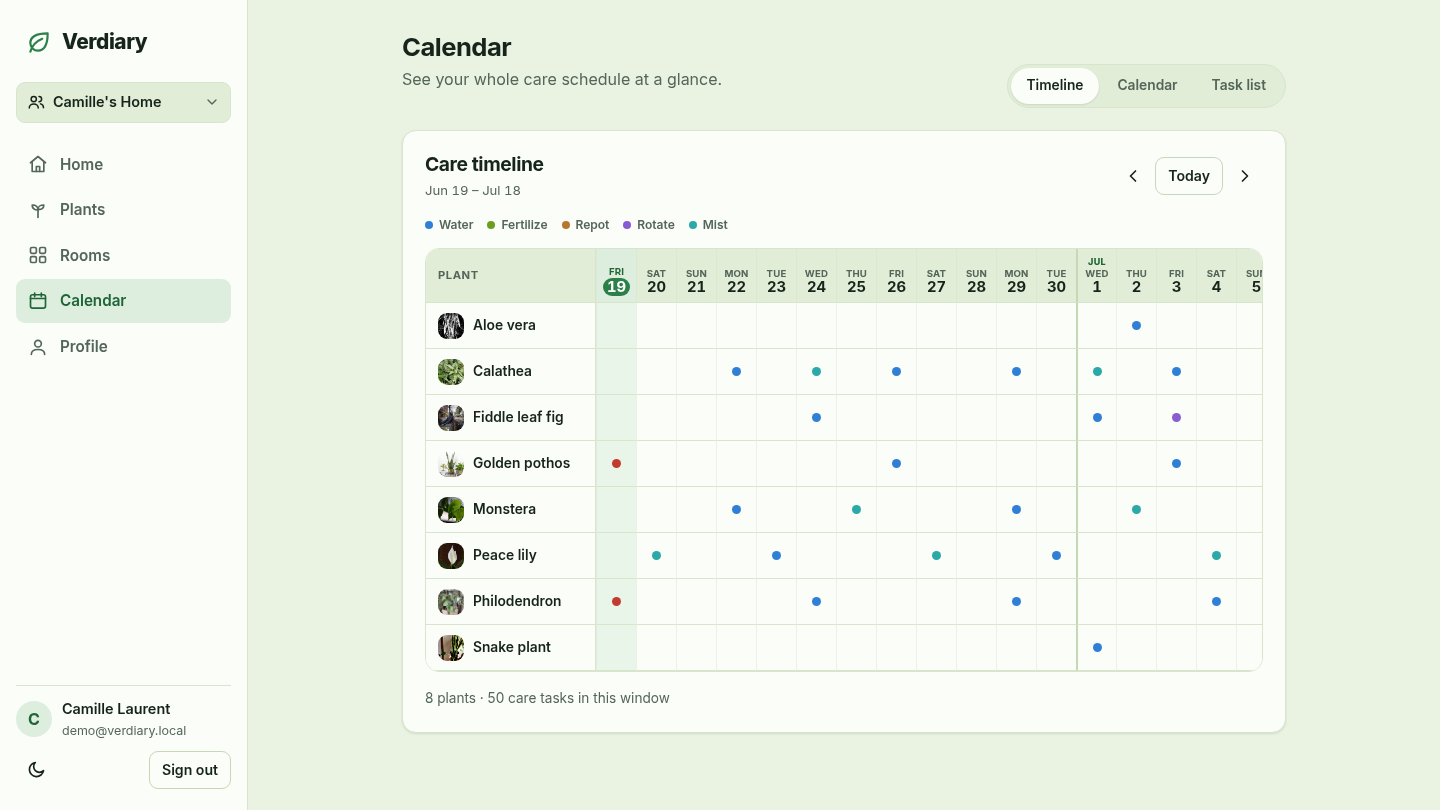
The home dashboard and care agenda use the same schedule data, so overdue, due-today, and upcoming tasks stay consistent wherever you check them.
Explore the calendar viewsScan overdue, today, and next-seven-day care without opening every plant.
Mark a reminder done from the dashboard or the plant’s page.
The completion is recorded and the task advances to its next due date together.
Choose a simple interval, a fixed weekday, or a monthly date. Verdiary does not pretend that a calendar can inspect the soil: the schedule remains yours to set and change.
Use a straightforward interval from 1 to 365 days. Completing the task starts the next interval from then.
Pick a fixed weekday pattern such as every Saturday, with an optional time of day.
Place lower-frequency work on a predictable monthly slot instead of counting days.
Use a visual timeline for the collection, a familiar month grid, or a practical task list. Completing a task removes that occurrence from upcoming views.
Each plant gets a row, with upcoming care plotted across the days ahead.
See which kinds of care fall on each day, then open one day for the details.
Scan a forward-looking agenda of upcoming care across the collection.
Illustrative care-history preview
WateredToday · completed from reminder
Next: SaturdayRotatedYesterday · logged directly
Ad-hocFertilized12 days ago · completed from reminder
RecordedCompleting a reminder records the action and advances its next due date in one step. You can also log an unscheduled action—“I did this today”—without creating a reminder.
Made a mistaken tap? Individual care-log actions can be removed. The record is useful history, not an irreversible audit trail.
See photos, notes, and care togetherGrant notification permission only if you want it. Untimed care can arrive as one 09:00 household-time digest; tasks with a chosen time can arrive then.
Quiet hours run from 22:00 through 07:59, and a household may choose either no overdue follow-up or one follow-up after 24 hours. On iPhone and iPad, Web Push requires the installed home-screen app.
Untimed tasks grouped for the household.
Overnight notifications wait until morning.
Suppressed when the task is already complete.
Verdiary tracks the routine you set. It does not currently adjust schedules for weather or season, diagnose disease, or claim that a due date proves a plant needs water.
Check the plant and use your judgment before completing a task. The value here is coordination and memory, not automated botanical authority.
These answers describe the tracker that is implemented today.
No. A plant can have recurring tasks for watering, fertilizing, repotting, rotating, misting, trimming, and weeding. All active tasks feed the same dashboard and calendar.
Yes. A task can repeat every number of days, weekly on a chosen weekday, or monthly on a date. You can also set an optional time of day.
Verdiary advances it to the next scheduled slot instead of showing the same occurrence again. Interval schedules restart from the time you complete them.
Web Push is available from the installed home-screen app on iPhone and iPad. Verdiary explains that requirement before offering notification permission.
Yes. An active household member—and a temporary sitter while access is valid—can complete allowed care tasks. The history records who performed an action.